


Dash Cam Mobile: Driver Record
4.03.00 Reviews
App Specs
- Version
- 1.7
- Updated On
- License
- Free
- Downloads
- 10,000+
- Developer
- CoolDev Co Ltd
- Categories
- Auto & Vehicles
- Platform
- Android
Screenshots
 Analysis by AppCompare
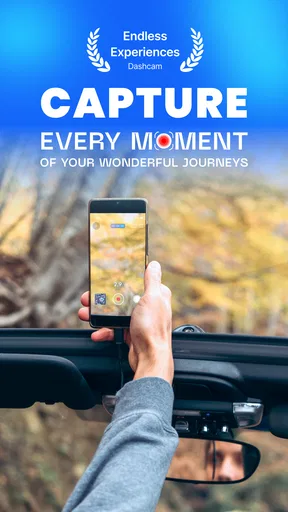
For a phone-based dash cam, the key question is not whether it can record a drive, but whether it fits smoothly into the routine of getting in, mounting the phone and setting off. Dash Cam Mobile: Driver Record is built around that practical job, with recording, GPS and speed tracking aimed at drivers who would rather try an app than buy a separate camera straight away. I’d treat it as a useful extra set of eyes, not as a substitute for paying attention or a guarantee that every important moment will be captured.
How quickly it fits into a driving routine
The first hurdle is less about learning a complicated interface and more about preparing the phone before the car moves. You need a secure mount, a camera view that is not blocked, and a power plan for longer trips. Once those are in place, a simple start-and-drive routine makes sense: position the phone while parked, check the view, begin recording, then leave it alone. Trying to adjust framing while driving defeats the point of a low-distraction recording tool.
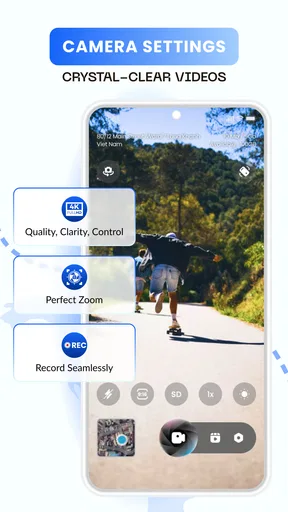
The app’s promise of 4K dash-cam-quality recording will appeal to anyone who wants useful visual detail, but the result still depends on the phone’s camera, the mount, the light and the road. A loose holder can turn otherwise sharp footage into a shaky record, while glare or a dirty windshield can make important details harder to see. I’d test the angle on a short, familiar trip and review the clip while parked before relying on it for a longer journey.
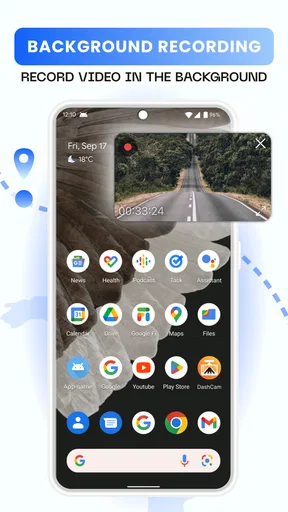
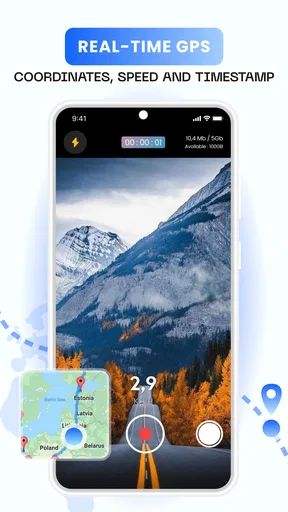
GPS and speed tracking add context that ordinary phone video does not provide by itself. That can help when you are trying to understand where a clip was recorded or how a drive unfolded. It also means the phone is doing more than simply filming, so I would not assume that every device will feel equally quick or cool during a long session. A brief test is a sensible way to learn how your particular handset behaves.
Busy drives and the moments worth saving
A realistic use case is a daily commute with a mix of slow traffic, lane changes and sudden stops. Recording can be useful if you later need to revisit what happened at a confusing junction, or if you want to keep a memorable stretch of road. The practical trade-off is that a phone serving as a camera is not as hands-off as a dedicated dash cam: it needs a stable position, a clear camera view and enough battery or external power to keep going.
For a longer outing, I’d make a small routine out of it rather than treating the app as something to set up once and forget. Before leaving, clear space if needed, connect power if the trip warrants it, and check that the lens is not obscured by the mount. At a stop, confirm that the phone is still positioned correctly. These steps are not glamorous, but they are more useful than discovering at the end of a drive that the camera was pointed at the dashboard.
It is also worth deciding in advance what you want to do with a recording. If the goal is to keep a particular stretch of scenery, you may want to review and share it soon after the journey. If the goal is to have a record of an incident, avoid fiddling with the screen in the moment; get to a safe place first, then check what was captured. This keeps the app in its proper role: recording support, not a reason to interact with a phone on the road.
Worth Reading Before You Choose

Baby Panda World Brings Quick Play to Modern Phones, but Its Game Library Feels Busy

ESPN’s Live Game View Makes Following Close Games Easier

QuizzLand Review: A Good Fit for Short Trivia Breaks, Not Every Player

Basketball Stars: Multiplayer Is Fast, but Can It Recover When Matches Go Wrong?

WEBTOON Turns Phone Updates Into a Better Reading Routine

Link to Windows Runs on Shared Habits, Not Social Feeds
What a phone-based camera does differently
Compared with a dedicated dash cam, a mobile app has an obvious advantage: you can try the approach using a device you already own instead of adding a separate camera to the car. It may suit occasional drivers, people borrowing a vehicle, or someone who wants to see whether recording is useful before buying hardware. A dedicated unit is often the more convenient choice for frequent drivers, though, because it can remain mounted and ready without taking over the phone you use for navigation, calls or music.
That difference matters most on demanding days. If you rely on your phone for turn-by-turn directions, running a recording app at the same time can make the handset serve several roles at once. The screen may be occupied, the camera needs a usable view, and the driver still needs to keep attention on traffic. I would choose a dedicated dash cam if I wanted an always-ready setup for daily professional driving or a vehicle shared by several people.
For occasional use, the mobile format can be a reasonable compromise, but it is not automatically the best choice for every car. A phone mount that works well for navigation may not give the camera a clean road view. Before a trip, check that the mount does not obstruct your view or interfere with safe access to the controls. If you cannot position the phone securely and legally where you drive, a separate camera—or no recording device at all—is the better decision.
Sharing footage without making it a chore
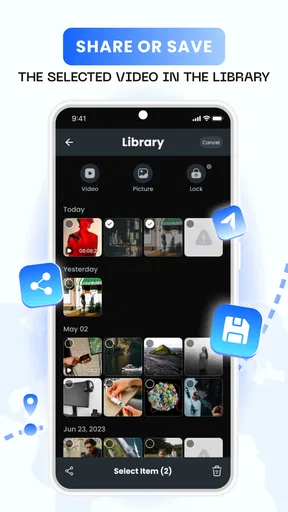
Sharing is most useful when you have a specific reason to send a clip, such as showing a route to a friend or keeping a relevant recording for later. Smartphone sharing can make that handoff feel more familiar than moving files from a separate camera, but the practical workflow still depends on the clip being easy to find and the destination being appropriate. I would review the video before sending it, especially if it includes passengers, other people’s vehicles or location details.
Cloud backup can be convenient as a second copy, but it should not be the only plan for an important recording. A sync problem, limited connectivity or an account setting can complicate access when you need a file. If a clip matters, confirm that it has actually reached the place you expect and keep a local copy until you are confident the transfer worked. That small check is more reassuring than assuming that “backed up” always means immediately available.
There is also a privacy trade-off in recording trips. GPS and video can reveal where you have been, while shared clips may contain more than the road event you meant to show. I would trim or review footage before distributing it and avoid treating public sharing as the default. For many drivers, the sensible use is simply to keep a relevant clip private unless there is a clear reason to send it.
Who will get the most from it
This app is most appealing if you drive now and then, already have a suitable phone mount, and want to experiment with recording without buying a dedicated camera first. It can also be useful for someone who wants video with location and speed context in the same general workflow. CoolDev Co Ltd makes it as an Auto & Vehicles app, and its focus is specific enough that a driver can judge it by one practical question: does using a phone as a recorder fit the way I drive?
I would be more cautious if you make long trips often, need a camera that is always ready, or depend on one phone for navigation and communication throughout the journey. In those cases, the extra setup and the phone’s competing jobs may outweigh the appeal of avoiding another device. It is also not a good fit for anyone who expects an app alone to guarantee evidence, automatic recovery or uninterrupted recording in every condition.
The app is free to install, though in-app purchases range from $1.99 to $38.99 per item. It is rated for Everyone, has a 4.4 average from 59 ratings, and has passed 10K+ installs. Those figures suggest that it has found an audience, but I would still base the decision on your own phone, mount and driving routine rather than popularity alone.
First Impressions: Setup and Interface
Installing Dash Cam Mobile: Driver Record was as smooth as a freshly paved road. A quick download from the app store, a couple of permissions here and there, and I was ready to roll. The interface is super intuitive. It’s got this clean, minimalistic vibe that doesn’t overwhelm you with too many buttons or settings. Just what you need when you’re trying to focus on the road.
Once you fire it up, the app opens to a straightforward dashboard. There’s a big red button to start recording, and honestly, even my tech-averse aunt could figure it out. The app doesn’t clutter your screen, which is perfect because you don’t want distractions when you’re driving, right?
Features You’ll Love
Now, let’s talk features because this is where Dash Cam Mobile really shines. One of the standout features is the loop recording. It records continuously, overwriting the oldest video to save space. So, no worries about your phone’s storage filling up.
Another nifty feature is the automatic incident detection. The app can sense a sudden brake or impact and will automatically save that clip. It’s like having a vigilant passenger who never misses a beat. Plus, the night mode feature enhances low-light recordings, making those late-night drives just as clear as day.
Performance on the Road
So, how does it perform? In short, like a champ. I took it on a road trip through some of the bumpiest terrains and it held up great. The video quality is top-notch, capturing crisp and clear footage whether it’s day or night. It even picked up the beautiful sunset during my evening drive. Talk about a bonus!
What’s really cool is that it didn’t drain my battery as much as I thought it would. I was apprehensive about having it running for long periods, but it’s optimized to keep your phone alive, which is perfect for those long hauls.
Sharing and Backup
Sharing videos with friends or your insurance company is a breeze. The app allows for quick sharing via email or social media. It also automatically backs up to your cloud storage, which is a lifesaver if your phone decides to take a swim or gets lost.
I had a minor hiccup with syncing to my cloud at first, but a quick restart of the app sorted it out. A small price to pay for peace of mind, if you ask me.
Final Thoughts: Should You Get It?
If you’re on the fence about getting a dash cam but don’t want to spend a fortune, Dash Cam Mobile: Driver Record is a solid option. It’s user-friendly, reliable, and doesn’t require any additional hardware. Plus, it’s pretty cool to have all your road adventures saved and ready to relive or share.
So, next time you hit the road, consider giving this app a try. It’s like having a digital co-pilot that’s always on the lookout, ready to capture your journey. Safe travels!
Pros
- Easy-to-use interface for quick setup.
- High-quality video recording with GPS tagging.
- Automatic recording upon vehicle movement.
- Supports cloud storage for video backup.
- Minimal battery usage during operation.
Cons
- Limited editing tools within the app.
- Requires subscription for premium features.
- Occasional GPS signal loss issues.
- Video files may be large in size.
- No night vision enhancement available.
FAQs for Dash Cam Mobile: Driver Record
What features does Dash Cam Mobile: Driver Record offer?
Dash Cam Mobile: Driver Record offers a variety of features including real-time video recording, GPS tracking, speed monitoring, and collision detection. The app also allows users to save footage directly to their cloud storage, ensuring that all recordings are securely backed up for future reference.
Is Dash Cam Mobile: Driver Record compatible with all smartphones?
Dash Cam Mobile: Driver Record is designed to work on most modern Android and iOS devices. However, to ensure optimal performance, your smartphone should meet the minimum system requirements, which usually include a certain level of processing power and available storage space. It's always a good idea to check the app's compatibility with your specific device model before downloading.
Does using Dash Cam Mobile: Driver Record affect battery life?
Yes, using Dash Cam Mobile: Driver Record can impact your device's battery life, especially during continuous video recording sessions. The app uses GPS and the camera, which are both energy-intensive features. It's recommended to have your phone connected to a power source while using the app on long drives to prevent battery drain.
How much storage space does Dash Cam Mobile: Driver Record require?
The storage space required by Dash Cam Mobile: Driver Record can vary depending on the length and quality of the video recordings. High-definition videos consume more storage. To manage space efficiently, the app offers settings to adjust the video resolution and the option to automatically delete older recordings when storage is low.
Is the footage recorded by Dash Cam Mobile: Driver Record admissible in court?
While footage from Dash Cam Mobile: Driver Record can be used as evidence, its admissibility in court may vary depending on jurisdictional laws. It’s advisable to check legal guidelines in your area regarding dash cam footage to understand how it can be used effectively in legal situations.


